
How to Participate in a PinkSale Fairlaunch ICO
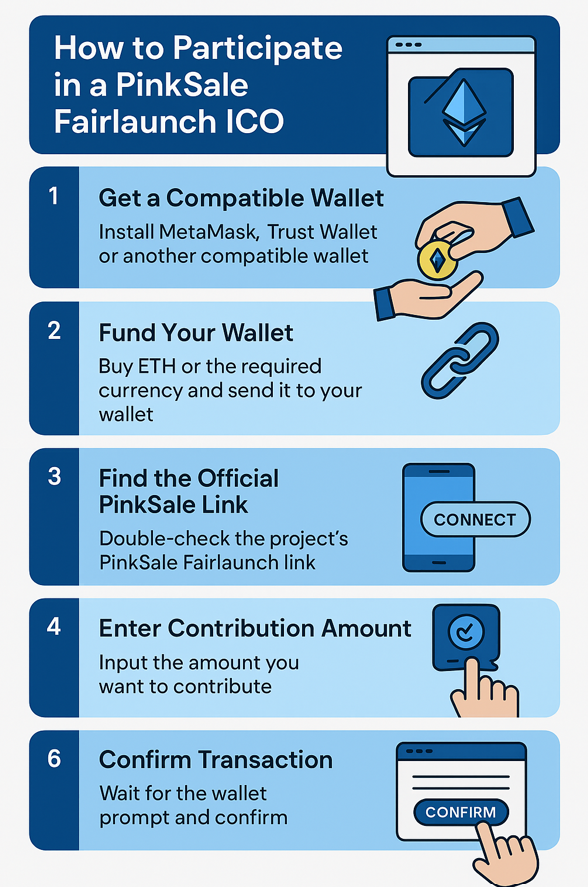
The world of crypto fundraising has introduced new ways for projects to raise money and for investors to get in early. One of the most popular platforms for this is PinkSale, a decentralized launchpad that makes token launches accessible to everyone. Among its offerings is the Fairlaunch ICO, a unique format designed for transparency and equal opportunity.
If you’ve heard about a project launching on PinkSale and want to get involved, here’s a step-by-step guide.
What is a Fairlaunch ICO?
In a traditional ICO (Initial Coin Offering), projects sometimes set hard caps or private allocations that give early access to insiders. A Fairlaunch is different:
- No presales or private sales — everyone enters at the same time.
- No maximum buy limit (unless set by the project) — tokens are distributed proportionally to the amount contributed.
- Equal opportunity — whether you invest $10 or $10,000, your share of tokens is based on your percentage of the total pool.
It’s designed to reduce the advantage of “whales” and give every participant a fair chance.
Step 1: Get a Compatible Wallet
To participate, you’ll need a crypto wallet that connects to decentralized apps (dApps). The most common options are:
- MetaMask (browser extension or mobile app)
- Trust Wallet (mobile app)
Make sure your wallet is set up on the blockchain the project is launching on (commonly Binance Smart Chain, or Ethereum, Polygon, or others).
Step 2: Fund Your Wallet
Buy the cryptocurrency you’ll need to contribute. For most PinkSale launches, that’s BNB (Binance Coin) if it’s on Binance Smart Chain or $ETH if using the Etherium Blockchain.
- You can purchase BNB/ETH from major exchanges like Binance, Coinbase, or Kraken.
- Transfer the BNB or ETH to your MetaMask or Trust Wallet address.
Always add a little extra BNB/ETH to cover gas (transaction) fees.
Step 3: Find the Official PinkSale Link
Each project will provide a PinkSale Fairlaunch link. Always double-check it from official channels (the project’s website, verified social media, or announcements).
⚠️ Beware of fake links — scams are common.
Step 4: Connect Your Wallet
- Open the PinkSale Fairlaunch page in your browser.
- Click Connect Wallet.
- Approve the connection through MetaMask or Trust Wallet.
Once connected, you’ll see your wallet address at the top.
Step 5: Contribute to the Fairlaunch
- Enter the amount of BNB/ETH (or required currency) you want to contribute.
- Click Contribute.
- Confirm the transaction in your wallet.
Your contribution is now locked into the pool until the Fairlaunch ends.
Step 6: Wait for the Launch to End
Fairlaunch events run for a set period (e.g., 3–4 days). During this time, anyone can contribute. Once the timer ends:
- The total amount raised is finalized.
- Tokens are distributed proportionally to contributors.
- Liquidity is automatically added to a decentralized exchange (DEX), like PancakeSwap, and locked for a set duration.
This ensures that the token is tradable immediately and protects investors against “rug pulls.”
Step 7: Claim Your Tokens
After the Fairlaunch ends, go back to the PinkSale page:
- Click Claim Tokens.
- Confirm the transaction in your wallet.
- Your new tokens will appear in your wallet. (You may need to manually add the token contract address if they don’t show up automatically.)
Final Thoughts
Participating in a PinkSale Fairlaunch ICO is straightforward once you understand the steps. It combines transparency with accessibility, giving investors worldwide the ability to back projects early.
Still, remember: every crypto investment carries risk. Always do your research on the project before contributing, and never invest more than you can afford to lose.
With the $nftXc ICO coming soon, this process will give our community a fair and transparent way to join the journey — from day one.